
Checklist items are individual tasks or steps within a checklist. You can create specific checklist items for each page on your website.
To Set Target for a Checklist Item:
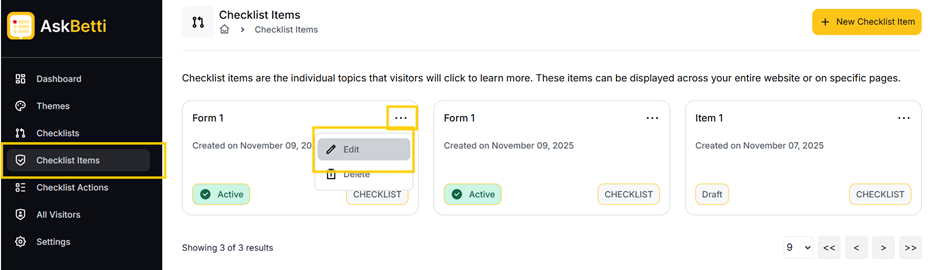
- Go to the Checklist Items section in the main menu. Here you will see a list of your existing checklist items.
- Click on the three dots in the top right corner of the item name.
- You’ll see the options to Edit, and Delete. Select Edit
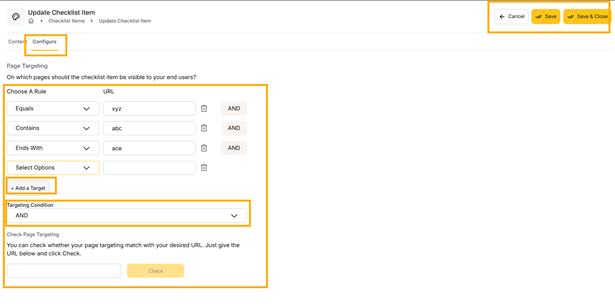
- Click on the Configure
 tab.
tab. - Set a target for the checklist by clicking on + Add a Target,
- Click on Save or Save & Close.
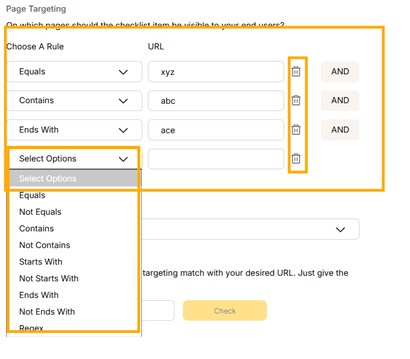
Page Targeting: This feature lets you control which pages your checklist appears on. Use AND/OR rules to set specific conditions for the URLs. For example, you can show a checklist only on pages that contain "product" AND "feature".’
[Note: To remove a rule, click on the bin icon.]
If you have any questions or need further assistance, please contact our support team.