
A Modal is a highly customizable popup window that appears over the main webpage content to deliver rich information or announcements. It offers various templates and a content editor for creating versatile visual experiences.
This template is designed for creating a promotional popup to display a discount or special offer.
To use Discount Modal template:
Open the AskBetti extension on your website.
Select the Checklist Item you want to add a modal to.
Click the + Action button.
Choose Modal as the action type.
Select the Discount Modal template.
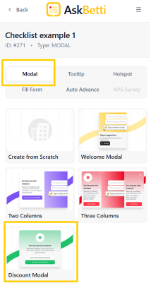
The modal will appear with a pre-designed layout for a discount offer, which you can then edit with your specific text, image, and discount code.
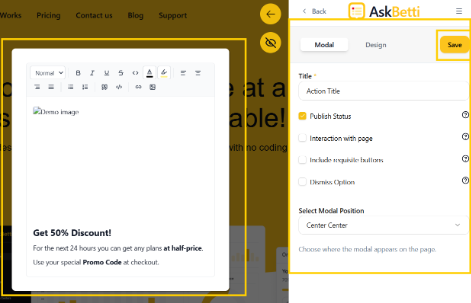
Click on Save.
If you have any questions or need further assistance, please contact our support team.