
A Checklist Action is the fundamental, specific event triggered when a user engages with a Checklist Item. It defines the interactive content, behavior, or validation process that is executed on the page.
To Delete an Action:
Open the extension and select a Checklist Item
 Hover over an Action.
Find the trash bin icon.
Click on the trash bin icon to delete the Action.
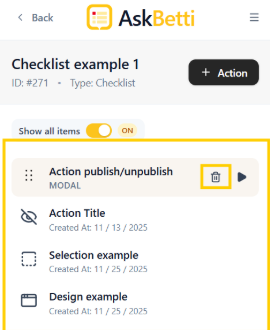
Action will be deleted.
If you have any questions or need further assistance, please contact our support team.