
Checklist Items are individual tasks or steps that appear in a checklist. You can create different checklist items for different pages on your website.
To create a new checklist Item:
Open your website and log in to the AskBetti web extension.
Click on the extension icon and click on + Item.
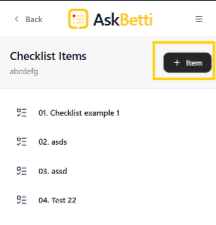
Name the checklist Item.
Select checklist type from Select Type dropdown.
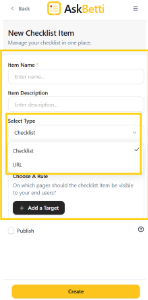
Click on + Add a Target under Choose a Rule to set target if needed.
Page Targeting: This feature lets you choose which pages your checklist will be visible on. You can use AND/OR rules to create specific conditions for the URLs. For example, you can display a checklist only on pages that contain "product" AND "feature".
Check the Publish box if want to publish it for the end user, else leave it unchecked.
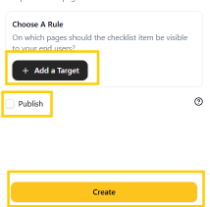
Click on Create.
If you have any questions or need further assistance, please contact our support team.